On this page, you will find some sound files that I made for my Nine Note Binary Musical Scale that can be played.
Haven't read the essay on Music and this new scale yet? Go here!
NOTE:
SINCE WRITING ALL THIS AND PUBLISHING IT IN MY BOOK, I HAVE DONE SOME
RETHINKING AND REWORKING OF THE FREQUENCIES. THESE NOTES ARE NEW. THEY
ARE ROUNDED OFF FROM EQUAL TEMPERMENT - STILL CLOSE TO WHAT WAS
PREVIOUSLY PUBLISHED, BUT WITH FRACTIONS THAT RESOLVE TO .5, .25, .125,
.0625 ETC. SO THAT HARMONIES ARE MORE PRECISE.
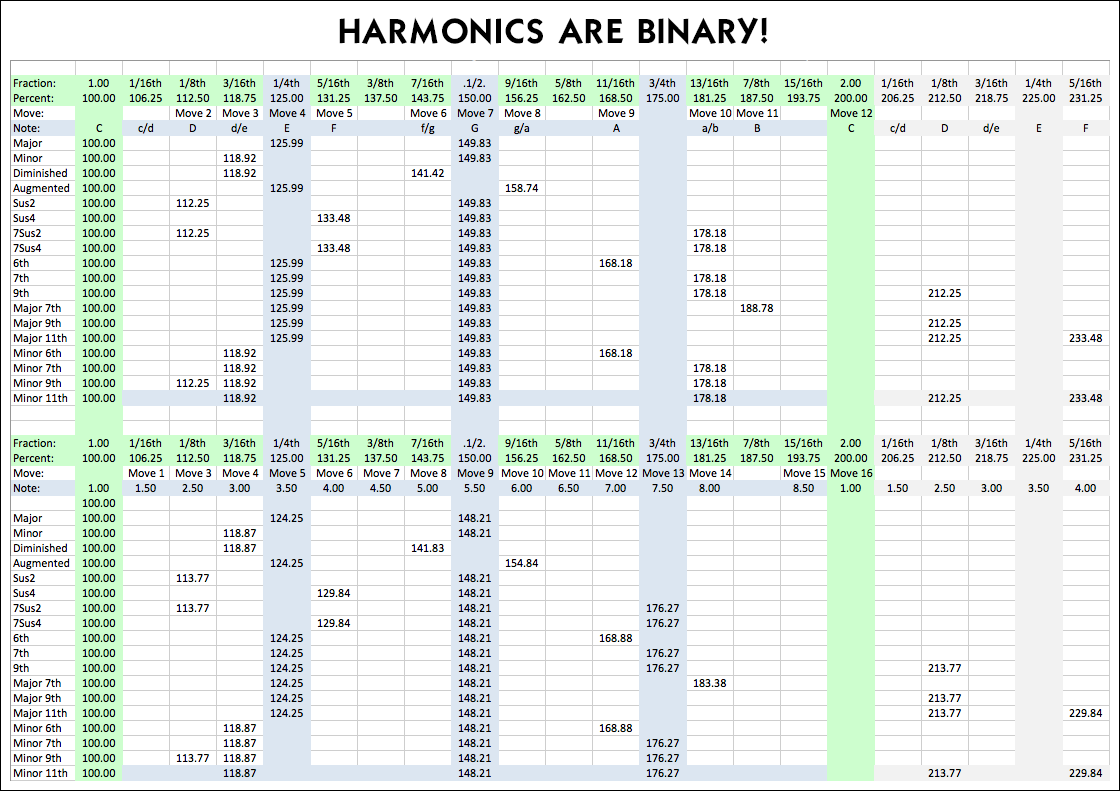
If you want to explor these notes, here are some suggestions for harmonies you might try. The top of the chart shows suggested harmonies for the 12 tone equal temperment scale. The bottom shows the same harmonies suggesting some uses of new notes. So try and use the bottom portion of this chart:
No
doubt many aficionados of music will reject these tones out of hand as
being an abomination to all music - at least traditional Western
musical notation. But for those who like to explore new and different
things this scale of tones might actually be useful... that is... if anyone were
to ever create an instrument capable of playing them. I don't have the capabilities myself to produce
any such instruments, but for those curious to know just how reasonable
or awful these tones are - by themselves or in comparison to
traditional Western musical notation I made the sound files listed below... and... I also made an app that can play them. In both cases, these notes might not sound as nice as
any acoustically refined instrument, but they might at least give you an
idea of what this new scale sounds like.
Here are those suggested harmonies: Use the bottom portion of this chart:
...
and try playing triads that land on those critical points of harmony -
the 1/4 or 125% mark (counting 5 from the root note), the 1/2 or 150%
mark (counting 4 more or 9 from the root), and the 3/4 or 175% mark
(counting 4 more or 13 from the root note). Then, try some others. Try
using my note 1 with the 4 and 6, (or, move 6 notes from the root and
then 4 more or 10 notes from the root note) which I guess could be
considered an augmented chord? Maybe? I dunno. Then try what I guess
might be considered diminished by using my 1 with the 3 and 5 (or, move
4 notes from the root and then 4 more or 8 from the root note). If you
want to hear a scale that sounds closer to tradition start anywhere,
skip two notes, then hit every other note until you've hit eight, then
move one note to the end.
But what about this app, you're asking. Well... I made an app, using Ai. I understand the anger and fear that people have towards Artificial Intelligence. I personally have accepted it and have used it to generate imagery for my tarot decks and to program code for some related devices. In both cases Ai allowed decades old dreams to be realized at small expense that would have otherwise been completely cost prohibitive, leaving those dream unrealized for life. For that I can only be grateful. It’s a tool, so I used it. I understand that it threatens to put a lot of people out of work, but me using isn’t taking work away from anyone, because I would not have been asking anyone to do the work for me, because I would never have been able to afford it, meaning, the work would never have existed for anyone to do it. So, nothing is being taken away from anyone. I understand the fears that it might exterminate humanity. But my experience with it makes me wonder how true all that fear really is. It can be pretty dumb, and my experience demonstrated that over and over.
When I asked an Ai code generator to write some code for a few things I wanted, it did a descent job. I didn’t get the kind of aesthetics of graphical user interface that I might have wanted, but I got something that was good enough, that worked. Along the way, there were struggles to get what I wanted. Sometimes those struggles were in me communicating what I want. Other times the struggle came from the Ai Bot just messing things up, stumbling over its own written code, and having trouble finding its own mistakes in order to correct them. In one instance it totally failed to fix a problem that it caused, and I eventually had to give up and start the whole project over again. I had a similar problem, to a much greater degree in my latest use of an Ai code writing Bot.
I briefly tried a few sources for code writing, and somehow ended up using Claude. It is very nice and polite. But… it does screw up. They even have a warning in small type that says Claude makes mistakes so be sure and check. I think this might be the code writing equivalent of image Ai Bots “hallucinating” and creating inaccurate images, or text writing Ai Bots making references to things that don’t actually exist. I think code writing Ai Bots perhaps lose their focus in strange and unpredictable ways, that cause them to not only make single small mistakes that can be corrected, but also make big catastrophic mistakes that decimate all progress and cannot be corrected. In all cases, it is truly amazing that they can do what they do, but in many ways they are still profoundly stupid.
After much toil and strife, an app was created. In the end, I am happy to have successfully created the music playing app that I wanted, however, I am not happy with how much pain and frustration it put me through. I am also not completely happy with the results of what we created, and am absolutely afraid to ask for any improvements to be made out of fear that the existing code will be decimated by another stupid “mistake” by the Ai Bot. So I am publishing this gadget as is, with all it’s shortcomings, because I think it is close enough to being usable, that people could use it to demonstrate to them selves whether a nine note musical scale has any viability at all. So give it a try and see what you think. You can start by trying to duplicate known music with the notes that are close to 12-TET notes and see how far “off” they sound. Then try using some of the NEW notes.
HERE IS A LINK (as of 03/31/26) TO THE APP! When it opens, click the "I" button for instructions.
And here are some instructions for how to use it… with my complaints about unfortunate limitations that probably would not exist if I had spent a fortune hiring a human programmer to create this!
INSTRUCTIONS:
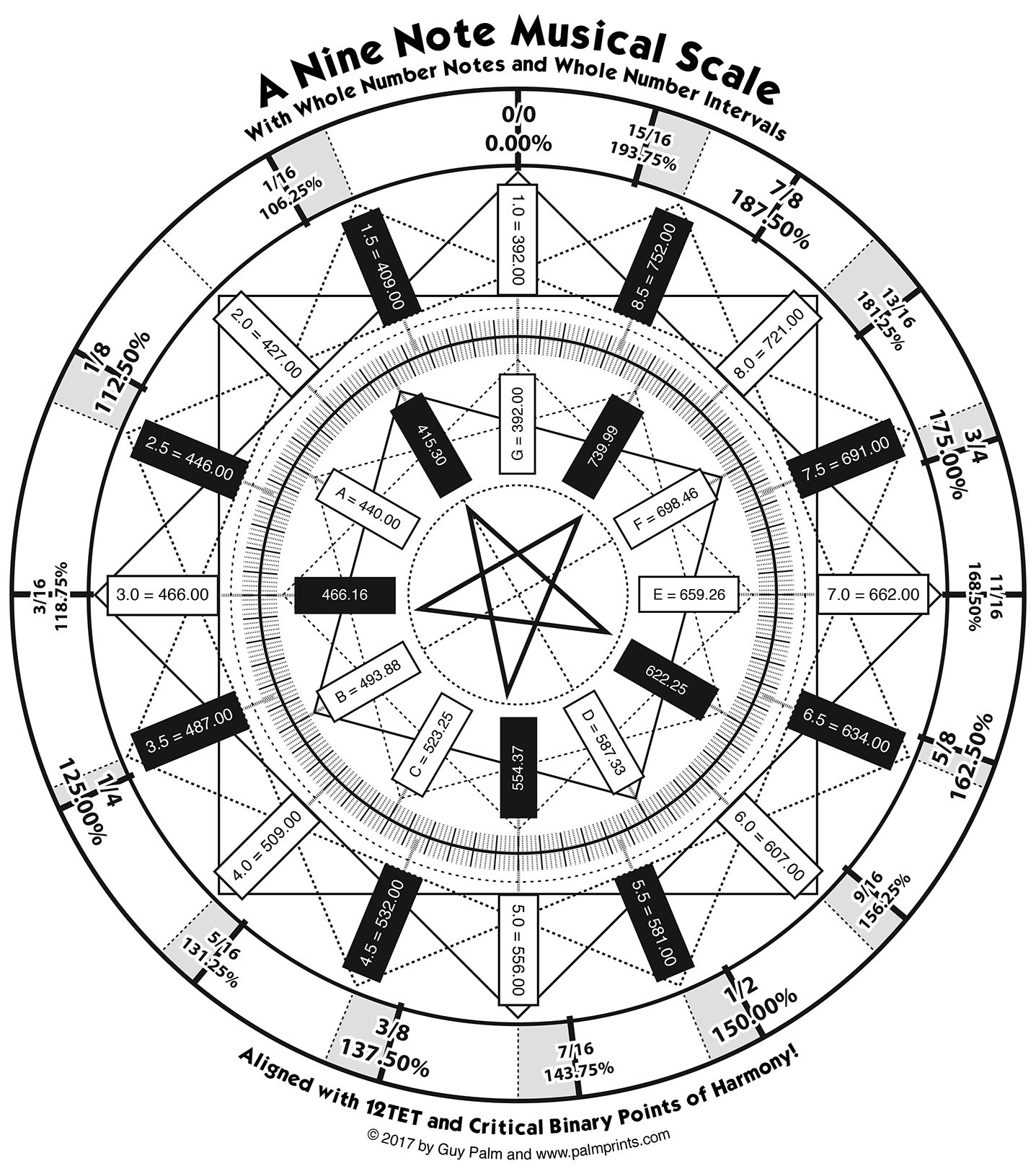
• You can use your computer keyboard to enter notes (see graphic on note location, using upper and lowercase). However… when we first programmed it, it entered note bars as desired, but it choked when trying to play the sounds of each note as keys were pressed. All you would hear when pressing a key was a series of short blips of sound. When we tried to fix it, the blips were gone, as was all sound completely. It still enters note bars, but you have to play in silence. Actually it still plays one tiny blip of sound. So if you are really good at playing, you can play the tune in your head and hit all the right keys and the notes will be placed for you, and then you can see how well you did! To record notes: activate the [KEYBOARD] button, then the [REC] button, then, the [PLAY] button and start playing. Then click stop or pause to stop. I think either one works to stop recording.
• After notes are placed, you can play the tune. The play button turns into a pause button, but it was only stopping the play head, it wasn’t stopping the sound of the note it was on from finishing its duration, so I had it add a stop button. It doesn’t really work. It usually just raises the note it’s trying to stop higher up for a while, and if the note is long enough it might eventually stop it. Click stop multiple times.
• You can only record up to 6 minutes. We tried to make vertical grid lines for every second of time, but it couldn’t do it for more than 60 seconds. You could move note bars beyond that point, but there would be no grid lines at all. So we tried changing it to have a limit of 20 minutes of grid. That didn’t work, so we tried a limit of 10 minutes. That didn’t work. So we tried 6 minutes. I think that didn’t work either, so we tried not having vertical lines every second at all, and went with a vertical line every 10 seconds. So 6 minutes with vertical lines every 10 seconds is where we left it. I’m afraid to try and change that. You can zoom in and out a bit on the grid to make note bar editing easier. And you can place the playhead line anywhere and use it in conjunction with the clock to align note bars to the same time.
• I asked for instruments to be included, and was hoping for sounds as impressive as the Garage Band app. I didn’t get that. All it could do was make adjustments to raw generated tones to make them sound like instruments. At the middle frequencies they don’t sound too bad. At the high and low extremes they kind of fail a bit. But their purity might make experimentation with these extra notes more clear. So try them out.
• You can upload your own sound files to be played, using the [+] button. But I was advised that to have multiple sound files permanently embedded might add too much size to the app. So we made it so you can upload sound files and assign them to note bars, but they do not get saved when a file is saved. You can save a file of your work [S] and open it again [O], but you will have to re-import your sound file(s) and re-assign them to the note bars that they were previously assigned to. Kind of tedious, but we did include a marquee selection ability to make it easier to grab a lot of note bars and re-assign them. If you are just experimenting with these notes, maybe try using the digitally created instruments that are permanently installed in the Musical Instrument Menu [M]. If you want to import your own sound file of an instrument, save a short sample of the instrument recorded at 196.00Hz G3 frequency. Save it as a .wav file. The program will calibrate according to that frequency and create all the other notes from there. I’m not sure exactly how accurate sound generation might be, to the extreme decimal point. I gave it frequency numbers that went out to five decimal points (note 02 is supposed to be 51.15625), but am noticing that the listed frequencies only go to two decimal places. I don’t know if that was only done to abbreviate the text visually, or if it was done to the actual notes that it is generating, either from its manufactured notes or from imported 196.00Hz notes. Let your ear be the guide and let me know what you hear. Keep in mind that notes that are associated with conventional 12-TET notes are not meant to be the same. They will be off by a small percentage. Depending on how this decimal point issue goes, that degree of discrepancy might be more or less than anticipated. Either way, the idea being presented with this app is that you can make nice music with these notes, whatever they may be. Can you?
• You can place note bars manually, move them around and adjust their duration time by dragging the right hand side out. Activate the [PLACE] button to place notes. Then deactivate the [PLACE] button so that subsequent clicks don’t place any more note bars. You can then hover over a note bar and see its duration and what instrument is associated with it. You can also read that information where it appears above the Volume Envelope Editor. I asked for this feature in case you have really long notes that you want to have blend into each other, you can have one note fade out and the other note fade in by adjusting the nodes. Or, you could just make the note waver in volume a bit by moving the nodes around.
• In addition to a marquee selection ability, you can also select individual note bars. You can also Command-Shift or Control-Shift to select multiple note bars. You can also Option-Click or Alt-Click to hear that one note bar play its note. If it’s a long note and you don’t want to listen to all of it, you can try using the stop button and see if it works!
• After you select a note bar, or a series of note bars, you can copy them to another location by using Opt/Alt and Shift and dragging them around.
• When you are all done composing something, you can export it out as a .wav file using the [E] button.
Let me know how it goes.
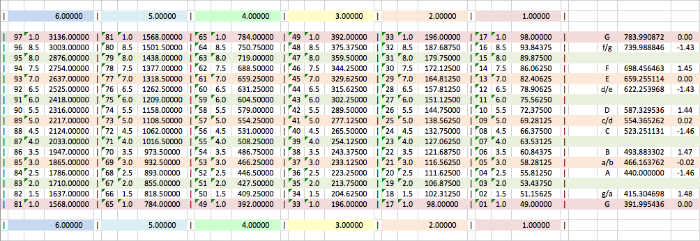
Below, I've created
two pianos. On the left, each sound file is about one second long, in
order to explore possible melodies. On the right, each sound file is
about seven seconds long. This way several notes can be played at once
for an extended time, in order to seek out harmonies.
For
those wanting to know what note each of these notes is close to in
traditional music, the right hand column of each table has indicators
that are rough approximations. But hey... DON’T USE THOSE CRAPPY NOTES LISTED BELOW!! I’VE MADE AN APP THAT PLAYS THE NOTES!
I’ll leave them there, in case the app becomes unavailable in the future, about the app above and try it out.
|